


AT&T
4.5157.20K Reviews
App Specs
- Version
- 2026.6.2
- Updated On
- License
- Free
- Downloads
- 100,000,000+
- Developer
- AT&T Services, Inc.
- Categories
- Productivity
- Platform
- Android
Screenshots
 Analysis by AppCompare
When I manage a mobile account, I want to check a bill or understand a data charge without turning a five-minute task into a support call. That is the practical appeal of the AT&T app: it brings common account tasks into one place. I see it as a useful companion for existing AT&T customers, not as a reason on its own to choose a carrier. How worthwhile it feels depends on whether you prefer handling service details on your phone and are comfortable signing in to an account app.
Trust starts with what you can inspect
Account apps sit close to sensitive information: bills, service details, and usage. I would treat this one as a convenient route to manage those matters, while still taking ordinary care with the account itself. Use a device you trust, protect access to your phone, and pause before entering account details if you are not sure you are in the official app. Those habits matter more than a polished home screen.
AT&T Services, Inc. develops the app, which is free and rated for Everyone. Its long-running presence and broad adoption may reassure people who simply want an official place to manage AT&T service, but popularity is not a substitute for checking account settings and making thoughtful choices. I would not use an account app on a shared device and leave it accessible to the next person.
What the app helps you manage
The main draw is having billing and data-use information together with account help and offers. That can make routine checks easier than switching between a carrier website, saved emails, and a phone call. The app is aimed at AT&T customers; if you do not have AT&T service, most of its practical value disappears.
I would use the bill view as a prompt to review a charge, not assume that a quick glance explains every line item. If something looks unfamiliar, open the relevant account details or contact support before making a change. Likewise, data-use information is handy for spotting a trend, but I would check it before making a plan decision rather than relying on one glance at a busy moment.
Small habits that make account tasks easier
A useful routine is to check the account after a billing notice or near the end of a service cycle, when there is still time to investigate an unexpected amount or a change in usage. If you share a plan with family, make the distinction between your own usage and the account’s overall figures before drawing conclusions. That simple pause can prevent a misleading reading from turning into an unnecessary plan change.
For a data-sensitive task, I would avoid rushing through a transaction while distracted. Confirm that you are signed into the right account, review the amount or choice on screen, and make sure you understand what you are changing. The app can bring account tasks within reach, but it cannot replace careful reading of the details you are approving.
Worth Reading Before You Choose

Flipboard Shows What News Apps Must Do Beyond the Feed

Switching to Android Auto Means Rethinking Your Driving Routine

Google Calendar Makes a Crowded Week Easier to Manage

Ludo King Makes the Most of the Minutes Between Plans

Baby Panda World Brings Quick Play to Modern Phones, but Its Game Library Feels Busy

ESPN’s Live Game View Makes Following Close Games Easier
Where it fits among the alternatives
Compared with a browser, a carrier app is often a more direct place to check service details on a phone. A browser may be preferable if you are already at a computer, need to compare information across several tabs, or do not want another app on your device. Calling support still makes sense when a situation needs a conversation or an explanation that is hard to resolve through self-service.
The app’s appeal is convenience rather than independence from AT&T: it is a carrier account tool, not a general bill organizer or a way to manage service from another provider. Someone who wants a single view of household expenses across several companies may be better served by a broader budgeting tool, while an AT&T customer who mainly needs account access may appreciate having the carrier’s tasks close at hand.
Who is likely to get the most from it?
I would recommend it most to customers who regularly check their bill, monitor data, or want to find support without starting from a phone menu. It can also suit someone who helps manage a household account and wants a convenient place to review service information. The key question is whether you expect to use those account functions often enough to justify keeping the app installed.
It is less compelling if you rarely touch your account, prefer doing everything on a desktop, or are trying to reduce the number of apps that can access account information. If you are not an AT&T customer, it is not a useful general-purpose productivity download. In those cases, a browser or the relevant provider’s own support route may be simpler.
Everyday use without rushing
Imagine checking your phone bill while waiting for a ride. You can open the account, review the amount, and note anything that needs a closer look. If the total seems different from what you expected, I would save the deeper investigation for a moment when I can read the account details carefully instead of tapping through while distracted. Convenience is valuable, but a short pause is worthwhile before a billing decision.
A similar approach works for data use: check it before a trip or a stretch of heavier phone use, then use what you see to decide whether your habits need attention. That is more useful than opening the app only after a surprise. Still, I would treat the displayed figure as an account-management aid, not a reason to assume every connected device or person on a shared plan is using the same amount.
Features are useful only when they fit the task
The app also provides access to deals and support, so it can be a reasonable starting point when you are already managing an account. I would keep those extras separate from essential account checks: a promotion does not automatically make a plan or device a good fit. Compare the terms and the total commitment with what you actually need before acting, rather than letting an offer turn a quick bill check into an unplanned purchase.
For help, self-service is a sensible first step when the question is straightforward. If the issue involves a confusing charge or a change with consequences you do not understand, reaching a person may be more efficient than repeatedly trying options in the app. I see the app as a way to choose the right route, not a promise that every account problem can be solved without assistance.
Availability and a measured verdict
The app has been available since April 28, 2010, and its current version is 2026.5.1. It has a 4.6 average from around 401,000 ratings, alongside roughly 156,000 written reviews and more than 100 million installs. Those figures suggest many people use it, but they cannot tell me whether it will suit your account habits or resolve a particular issue.
It is a free productivity app, and Android users need version 9 or later. I would still check that your device and account work smoothly with the current release before relying on it for a time-sensitive task. Keeping an app current is a sensible general practice, especially for something used to reach account information, but I would not treat a version number or a large audience as a guarantee of a perfect experience.
Getting Started with AT&T
First things first, downloading and installing the app is a breeze. Whether you’re on Android or iOS, just hop over to your respective app store, search for AT&T, and you’ll be set in no time. Once you’ve got it installed, you’re greeted by a clean and intuitive interface. I love how it doesn’t bombard you with unnecessary options right off the bat. It’s straightforward, which is exactly what you need when managing your mobile account.
The Interface and Usability
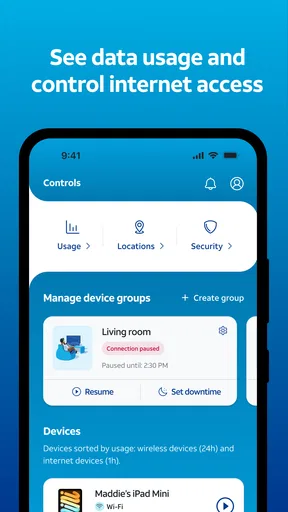
The design is modern and user-friendly. The colors are easy on the eyes, and the navigation is smooth. I really appreciate apps that don’t require a PhD to figure out. You’ll find all the essentials on the home screen: your current bill, data usage, and any alerts or messages from AT&T. It’s all laid out in a way that makes sense, even if you’re not super tech-savvy.
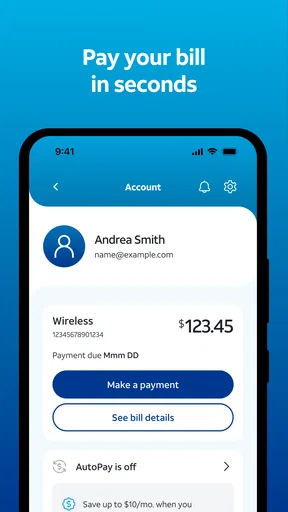
One of the standout features here is the Quick Pay option. This allows you to settle your bill without logging in, which is perfect for those of us who are always on the go. Plus, there’s a handy option to view your account details and manage your plan, all with just a few taps.
Managing Your Plan and Usage
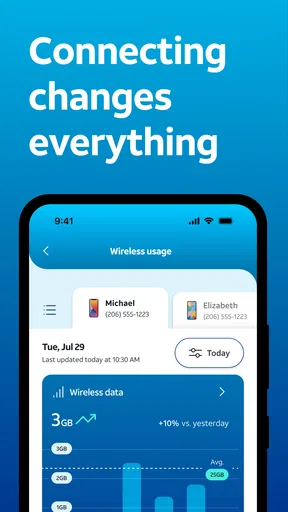
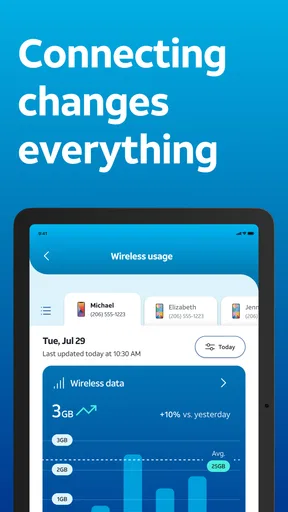
Now, onto the meat of the app – managing your plan and keeping an eye on your usage. The app provides a detailed breakdown of your data consumption, which is a godsend if you’re trying to avoid overage fees. You can see exactly how much data you’ve used, and it’s updated in real-time.
Changing your plan is also a cinch. Whether you need more data or want to tweak your current package, it’s all possible right from the app. There’s no need to sit on hold with customer service for hours; you can handle it all yourself. For me, that’s a huge plus.
Customer Support Features
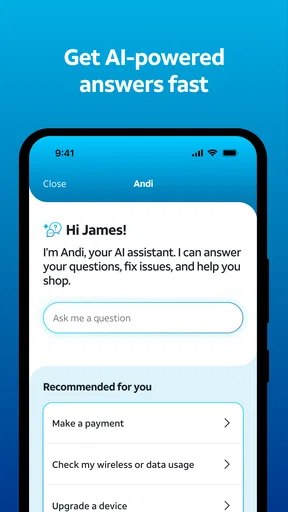
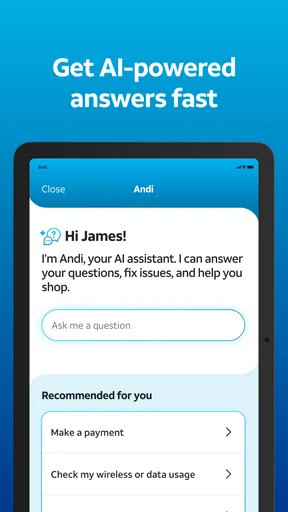
Speaking of customer service, the app includes a robust support section. You can chat with a representative directly through the app, which is way more convenient than calling in and navigating through a maze of phone menus. There’s also a comprehensive FAQ section that’s great for troubleshooting common issues.
If you’re the type who prefers to handle things yourself, you’ll appreciate the self-service options. From technical support to account inquiries, it’s all there. I found the representatives to be responsive and helpful, which is always a good sign.
Additional Perks
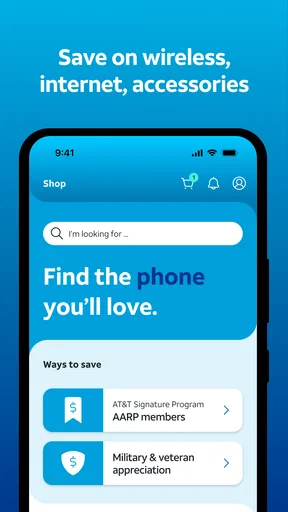
Beyond the basics, the app offers some cool extras. You can shop for new devices and accessories right from your phone. Plus, there are exclusive deals and promotions available only through the app, so it’s worth keeping an eye out for those.
Another nifty feature is the Store Locator. If you need to visit a physical store, the app will help you find the nearest location and even provide directions. It’s these little touches that make the app feel like a one-stop shop for all your mobile needs.
Final Thoughts
All in all, the AT&T app does a stellar job of making mobile account management easy and efficient. It’s packed with features but still manages to remain user-friendly, which is no small feat. Whether you’re checking your data usage, paying your bill, or shopping for new gadgets, it can all be done in a few taps.
So, if you’re an AT&T customer, I’d say this app is a must-have. It simplifies everything, saving you time and possibly some frustration. Give it a shot, and you might find yourself wondering how you managed without it!
Pros
- User-friendly interface for easy navigation.
- Comprehensive coverage maps available.
- Seamless integration with other AT&T services.
- Reliable network performance in most areas.
- Variety of plans to suit different needs.
Cons
- App occasionally experiences slow load times.
- Limited functionality without internet access.
- Some features require additional fees.
- Occasional glitches during updates.
- Customer support can be slow to respond.
FAQs for AT&T
What features does the AT&T app offer?
The AT&T app provides a range of features, including the ability to manage your account, view and pay bills, check data usage, and upgrade or add new services. Additionally, it offers support features like troubleshooting guides and the ability to chat with customer support directly from the app.
Is the AT&T app available for both Android and iOS devices?
Yes, the AT&T app is available for download on both Android and iOS platforms. Users can download the app from the Google Play Store for Android devices and the Apple App Store for iOS devices, ensuring a seamless experience across different mobile operating systems.
Does the AT&T app offer secure transactions?
Absolutely, the AT&T app is designed with robust security measures to ensure that all transactions, including bill payments and account updates, are secure. The app uses encryption and other security protocols to protect users' personal and financial information from unauthorized access.
Can I use the AT&T app to manage multiple accounts?
Yes, the AT&T app allows users to manage multiple accounts in one place. Whether you have multiple lines or services, the app provides a streamlined interface to switch between accounts, check usage, and make payments, making it convenient for families or businesses.
What should I do if I encounter issues with the AT&T app?
If you experience issues with the AT&T app, there are several troubleshooting steps you can take. First, ensure that you have the latest version of the app installed. If problems persist, try clearing the app's cache or restarting your device. You can also access customer support via the app for further assistance.


